Shipping a React app as a Windows MSI, database included
How we package a full-stack web app: React frontend, Node backend, PostgreSQL included, into self-contained Windows MSI and Linux .deb installers that run fully offline, survive upgrades without losing data, and build automatically in CI.

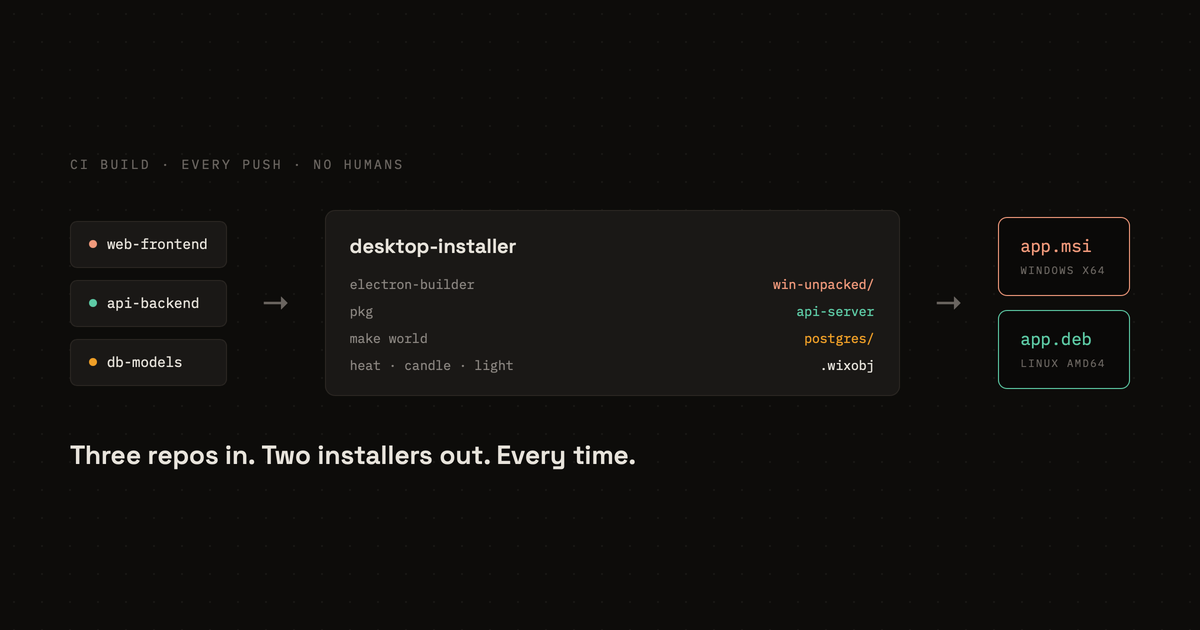
We built the product: React on the front, a Node service behind it, PostgreSQL underneath. It ran the way most software runs, on a server we managed, reached through a browser. Then the customer decided they wanted it on their own hardware instead, inside their own network, and we had to hand them the entire stack as something they could install.
That is a different product. The code is the same, but now everything we had been running for them has to arrive in one file and set itself up on a machine we will never see. A frontend, a backend, and a database, installed by someone who has no reason to know how any of it fits together. No server for us to fix. No Docker. No shell access.
Electron handles the first part. It's how VS Code and Slack got to the desktop, and wrapping the React frontend took about an afternoon. Everything after that took three weeks: compiling the Node service to a single binary with pkg, shipping PostgreSQL 16 inside the installer, building a Windows MSI and a Linux .deb, and getting CI to emit all of it on every push without anyone babysitting the build. This is that part, with the real commands.
This is the complete build, with the real commands. Follow it top to bottom and you will have a web app turned into a Windows MSI and a Linux .deb / AppImage, each one a self-contained install of the entire stack, produced automatically in CI. Throughout, the app is called App and the repositories are web-frontend, api-backend (which shares a db-models package), and desktop-installer. Substitute your own names.
What you’ll build
Three source repositories and two layers of packaging. That second point is the one to keep in your head:
- Layer 1 (Electron) turns the React frontend into a standalone desktop app (an
.exe+ resources on Windows, an ELF binary + resources on Linux). This happens inweb-frontend. - Layer 2 (system installer) takes that packaged app and bundles it with the compiled backend, a database, and an analytics service into one OS installer. This is what
desktop-installerdoes.
desktop-installer holds no application code. It clones the source repos, builds each one, adds PostgreSQL and the analytics service, and emits the installers.
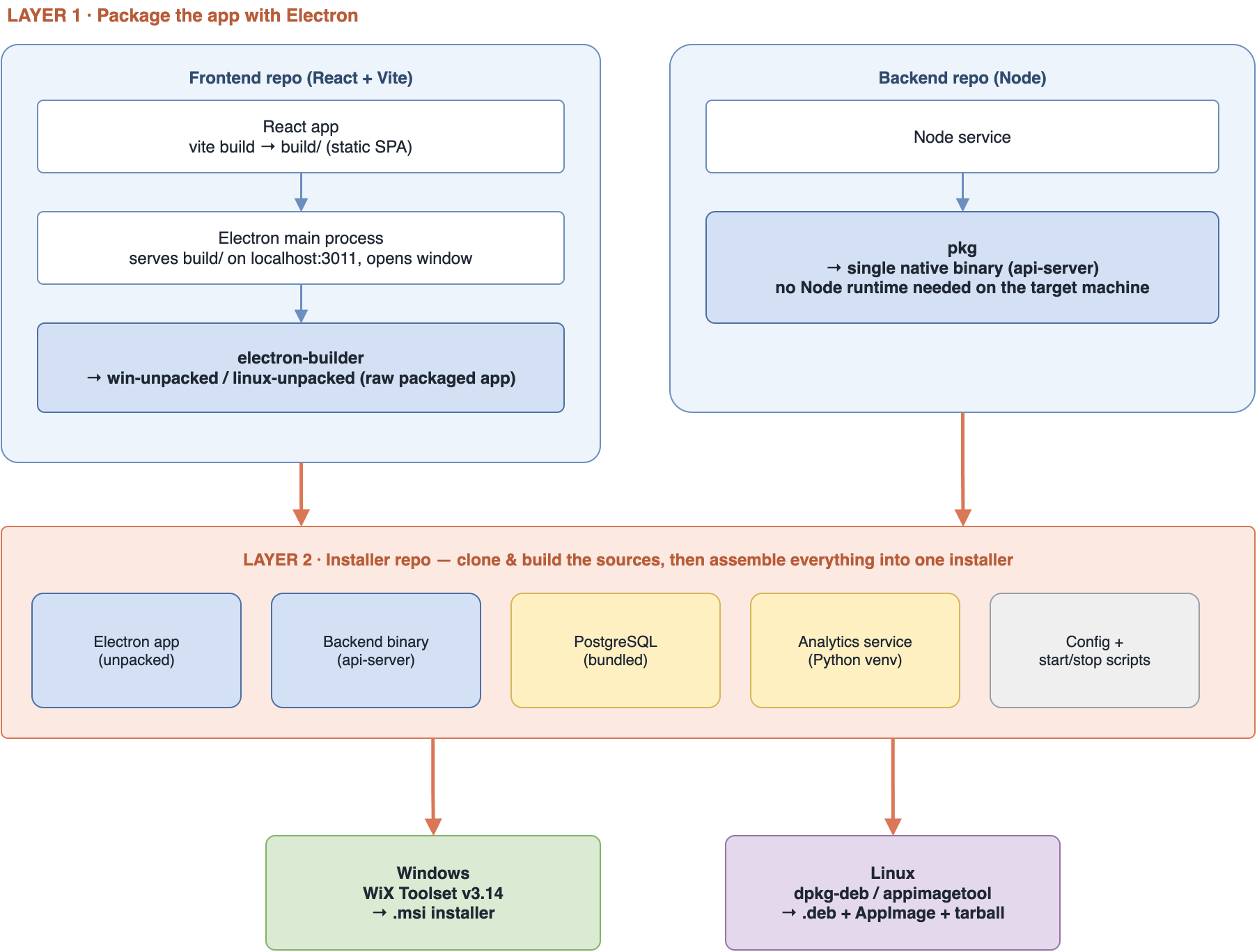
The moving parts:
| Component | Source | What it is | How it ships |
|---|---|---|---|
| Frontend | web-frontend |
React app (Vite) wrapped in Electron | Electron desktop app (.exe / ELF binary) |
| Backend | api-backend (+ db-models) |
Node/TypeScript service | Single native binary via pkg (no Node on the target) |
| Database | bundled | PostgreSQL 16, compiled from source | Binaries shipped inside the installer, DB created on install |
| Analytics | bundled | Apache Superset | Python virtualenv set up on the target machine |
| Installer | desktop-installer |
Build orchestrator | WiX (MSI) on Windows, dpkg-deb / appimagetool on Linux |
What the end user experiences: they download one installer, run it, and the app launches, with its backend, a local PostgreSQL, and the analytics UI all running on their machine. Nothing to configure, no accounts, no cloud.
Prerequisites
To follow along you need:
- A React frontend built with Vite (any bundler works; specifics below are Vite).
- A Node/TypeScript backend that can be compiled with
pkg. Avoid native addons pkg cannot embed, or ship them asassets(Step 2). - Node 22+ and npm 10+ on the build machine.
- To build the Windows MSI: a Windows machine (or CI executor) with the WiX Toolset v3.14 (
candle.exe,light.exe,heat.exeon the PATH). - To build the Linux packages: a Linux machine with
build-essential,dpkg-dev, and the headers to compile PostgreSQL (libssl-dev,zlib1g-dev,libreadline-dev), plus optionallyappimagetool. Python 3.8+ is needed on the target for the analytics service. - Somewhere to publish artifacts (we use S3) and a CI provider (we use CircleCI).
Step 1. Package the frontend as a desktop app (Electron)
Everything here is in web-frontend.
The React build is just a website
npm run react-build (vite build) produces a static build/ folder, HTML, JS, CSS. Nothing Electron-specific yet.
"scripts": {
  "react-build": "vite build",
  "start-electron": "concurrently \"vite\" \"wait-on tcp:127.0.0.1:3000\" \"electron ./electron-dev.js\"",
  "electron-build-windows": "electron-builder --windows nsis:x64",
  "electron-build-linux": "electron-builder --linux deb --x64"
}
Two Electron main processes: dev and production
Electron needs a “main process” that opens a window. In development it points at the Vite dev server so you get hot reload inside a desktop window; start-electron runs Vite and Electron together via concurrently + wait-on.
In production there is no dev server, so the shipped main process starts a tiny Express server that serves the built build/ folder locally, then opens the window at that URL:
const { app, BrowserWindow } = require('electron');
const express = require('express');
const path = require('path');

const server = express();
server.use(express.static(__dirname));
// SPA fallback: any route returns index.html so client-side routing works
server.get('*', (req, res) => res.sendFile(path.join(__dirname, 'index.html')));

app.on('ready', () => {
  server.listen(3011, () => {
    const win = new BrowserWindow({ width: 900, height: 680, autoHideMenuBar: true });
    win.loadURL('http://localhost:3011');
  });
});
Why an Express server instead of win.loadFile('index.html')? The app is a single-page app: it needs a real HTTP origin and a routing fallback (server.get('*', ...)). Loading off disk with file:// breaks both. Serving it locally is the reliable way.
electron-builder, and the folder we actually use
electron-builder (configured under the build key in package.json) packages the app. The important, non-obvious detail: we do not ship the .nsis / .deb file it produces. We take the intermediate win-unpacked / linux-unpacked folder, the raw packaged app (the executable, the Electron runtime, and resources/), and re-wrap it in Layer 2, because the final installer has to carry the backend, database, and analytics service too, not just the UI.
The build script clones the repo, installs, builds React, builds Electron, and copies that unpacked folder out:
git clone -b "$FRONTEND_BRANCH" <web-frontend-repo>
cd web-frontend
npm i --force
NODE_OPTIONS="--max-old-space-size=8192" npm run react-build
NODE_OPTIONS="--max-old-space-size=8192" npm run electron-build-linux
# electron-builder may emit dist/ or build/ or out/; probe for the unpacked dir
cp -r dist/linux-unpacked/* "$OUT/frontend/"
# the binary comes out named after the Electron project; give it a stable name
mv "$OUT/frontend/electron" "$OUT/frontend/App"
Step 2. Compile the backend to a single binary (pkg)
If the installer shipped raw Node source, every customer machine would need the right Node version, an npm install at install time, and a way to keep it running. Instead we compile the backend into one self-contained executable with pkg, so the target needs no Node runtime at all.
Resolve the shared package, then compile TypeScript
Our backend depends on a separate internal package (db-models). pkg bundles whatever is in node_modules, so that shared package has to be resolved locally before compiling, either with npm link or by pinning a file: / git dependency:
git clone -b "$BACKEND_BRANCH" <api-backend-repo> && cd api-backend
git clone <db-models-repo>              # sibling checkout of the shared package
# point the dependency at the local copy, then install
npm install
npx tsc --noEmitOnError false           # TypeScript -> dist/
Two real gotchas here: the TS compiler may emit to dist/src/* instead of dist/* (flatten it if so), and any SQL/asset files must have LF line endings and be copied into dist/ because pkg only embeds what you tell it to (next section).
# normalize SQL and copy it where the runtime expects it
mkdir -p dist/sql
for f in src/sql/*.sql; do tr -d '\r' < "$f" > "dist/sql/$(basename "$f")"; done
Tell pkg what to embed, then build
pkg only embeds JS it can statically trace. Anything loaded dynamically, SQL files, image libraries, vendored assets, must be listed explicitly under scripts (JS to include) and assets (non-JS to include) in package.json:
"pkg": {
  "scripts": ["dist/**/*.js"],
  "assets": ["dist/sql/**/*", "node_modules/<native-asset-packages>/**/*"],
  "targets": ["node18-linux-x64", "node18-win-x64"]
}
Then the build is a single command per platform. The output is one file with the Node runtime baked in:
# Linux
pkg . --target node18-linux-x64 --output "$OUT/backend/api-server"
# Windows (produces api-server.exe)
pkg . --targets node18-win-x64 --output api-server
At runtime the installer starts this binary directly (./api-server), no node, no node_modules. Copy the dist/sql files and any .env / config templates next to it.
Step 3. Bundle PostgreSQL (the app ships its own database)
Self-contained means the database travels inside the package; it does not assume PostgreSQL is on the machine. On Linux we compile PostgreSQL from source once in CI, trimmed to only what we need, and install it into the payload:
POSTGRES_VERSION=16.9
./configure --prefix="$OUT/postgres" \
  --without-icu --without-ldap --without-python --without-perl --without-tcl \
  --with-openssl --enable-thread-safety --enable-rpath \
  --with-extra-version="-app"
make -j"$(nproc)" world
make install-world
# strip binaries and drop docs/man/include to shrink the payload
Because those binaries live in a non-standard prefix, anything that runs them has to point the dynamic loader at the bundled libs. That is the whole job of a tiny wrapper the installer ships:
#!/bin/bash
# postgres-wrapper.sh: run any bundled pg tool with the bundled libs on the path
export LD_LIBRARY_PATH="/opt/app/postgres/lib:$LD_LIBRARY_PATH"
export PATH="/opt/app/postgres/bin:$PATH"
exec "$@"
The database itself is created at install time, not at build time, so each machine gets its own cluster. Initialize it with SCRAM auth and a dedicated role, then create the app database:
# create the cluster (run as the unprivileged "app" user, never root)
initdb -D /opt/app/pgdata -U app --pwfile=<pwfile> -E UTF8 -A scram-sha-256
# configure-postgresql: localhost-only, standard port, small footprint
cat >> /opt/app/pgdata/postgresql.conf <<'EOF'
listen_addresses = 'localhost'
port = 5432
max_connections = 100
shared_buffers = 128MB
EOF-- create-database: the app's own database, owned by the app role
CREATE DATABASE app OWNER app;
GRANT ALL PRIVILEGES ON DATABASE app TO app;Do not hardcode the superuser password the way an early draft might; generate it at install time and hand it to initdb via --pwfile, then delete the temp file. pg_hba.conf is set to scram-sha-256 for local and 127.0.0.1/32, so nothing on the network can reach it.
Step 4. Bundle the analytics service (Superset)
The analytics service (Apache Superset) needs the machine’s Python, so unlike PostgreSQL it is set up on the target at install time into an isolated virtualenv. To keep installs offline and reproducible, the wheels are pre-downloaded into the payload and pip installs with --no-index:
python3 -m venv /opt/app/backend/superset
/opt/app/backend/superset/bin/pip install --upgrade pip
# install only from the wheels we shipped, never from the internet
/opt/app/backend/superset/bin/pip install \
  --no-index --find-links /opt/app/backend/download \
  -r /opt/app/backend/requirements.txt
Its config file pins the metadata DB and secret; we ship a pre-seeded metadata database so an admin user already exists (no interactive create-admin during install):
# ~/.superset/superset_config.py
import os
SECRET_KEY = '<generated-at-install>'
SQLALCHEMY_DATABASE_URI = 'sqlite:///' + os.path.expanduser('~/.superset/superset.db')
WTF_CSRF_ENABLED = True
MAPBOX_API_KEY = ''
It ends up serving on http://localhost:8088. On Windows this same setup is optional, gated behind a checkbox in the installer (Step 6).
Step 5. Write the app’s config at install time
The last wiring step is the app’s own config, which tells the backend where the database is and the frontend where the backend is. The installer ships a template and copies it into the user’s config dir only if one is not already there, so a reinstall never clobbers a customer’s settings:
# Linux: ~/.config/app/backend/app.conf   |   Windows: %APPDATA%\App\backend\app.conf
if [ ! -f "$DEST/app.conf" ]; then
  cp /opt/app/backend/app.conf.default "$DEST/app.conf"
  chmod 644 "$DEST/app.conf"
fi
The template holds the DB host/port/name/user/password (pointing at the bundled PostgreSQL on localhost:5432), the backend port, and the frontend URL. Keep real secrets out of the repo; generate them at install time.
By the end of Steps 1 to 5 the payload the installer will wrap looks like this:
frontend/      Electron app (App executable + resources)
backend/       api-server binary + superset venv + wheels + requirements.txt + app.conf.default
postgres/      bundled PostgreSQL binaries + lib
scripts/       configure-postgresql, create-database, postgres-wrapper, configure-superset, ...
Step 6. Wrap it into a system installer
This lives in desktop-installer, a repo with no application code, just the per-OS build scripts, the WiX authoring, and the installer assets. The layout mirrors the two platforms:
desktop-installer/
  package.json                    # version + "build:windows" / "build:linux" scripts
  .circleci/config.yml            # the two build jobs + the preview workflow
  linux/
    scripts/
      build.sh                    # orchestrator (backend -> frontend -> postgres -> package)
      build-backend.sh            # clone api-backend, tsc, pkg -> api-server
      build-frontend.sh           # clone web-frontend, react-build, electron-build
      compile-postgres.sh         # ./configure + make world (Step 3)
      prepare-postgres.sh         # alternative: drop in pre-built binaries
      postgres-wrapper.sh         # LD_LIBRARY_PATH shim for the bundled pg tools
      configure-postgresql.sh     # initdb + postgresql.conf / pg_hba.conf
      create-database.sh          # CREATE DATABASE app OWNER app
      install_superset.sh         # ensure python3 + venv deps on the target
      configure-superset.sh       # venv + offline wheels + superset_config.py
      configure-app-config.sh     # copy app.conf template if absent
    assets/
      app-icon.png
  windows/
    scripts/
      build-complete.ps1          # orchestrator (same sequence as build.sh)
      build-backend.ps1
      build-frontend.ps1
      prepare-installer-files.ps1 # assemble pre-build-files/ that the .wxs expects
      build_msi.ps1               # heat -> candle -> light
      ensure-assets.ps1           # validate/placeholder the installer UI images
      configure-postgresql.ps1    # initdb.exe (deferred custom action)
      configure-superset.ps1
      configure-app-config.ps1
    src/installers/
      app.wxs                     # the WiX authoring
    assets/
      app-icon.ico  Banner.bmp  Dialog.bmp
  # generated during a build (gitignored), the payload the packagers wrap:
  pre-build-files/{frontend,backend,postgres}/
  temp-complete/  temp-frontend/  temp-backend/
  dist/                           # the finished .msi / .deb / AppImage / tarball
Two parallel implementations, same payload. The orchestrators (build-complete.ps1, build.sh) run the same sequence: build backend (Step 2), build frontend (Step 1), prepare PostgreSQL (Step 3), assemble the layout, then build the package. Both take FRONTEND_BRANCH / BACKEND_BRANCH env vars (default main) so a build can pin any source branch.
Linux: the .deb, its postinst, and how the stack runs
The .deb installs everything under one prefix (/opt/app), and a start script boots the whole stack in dependency order.
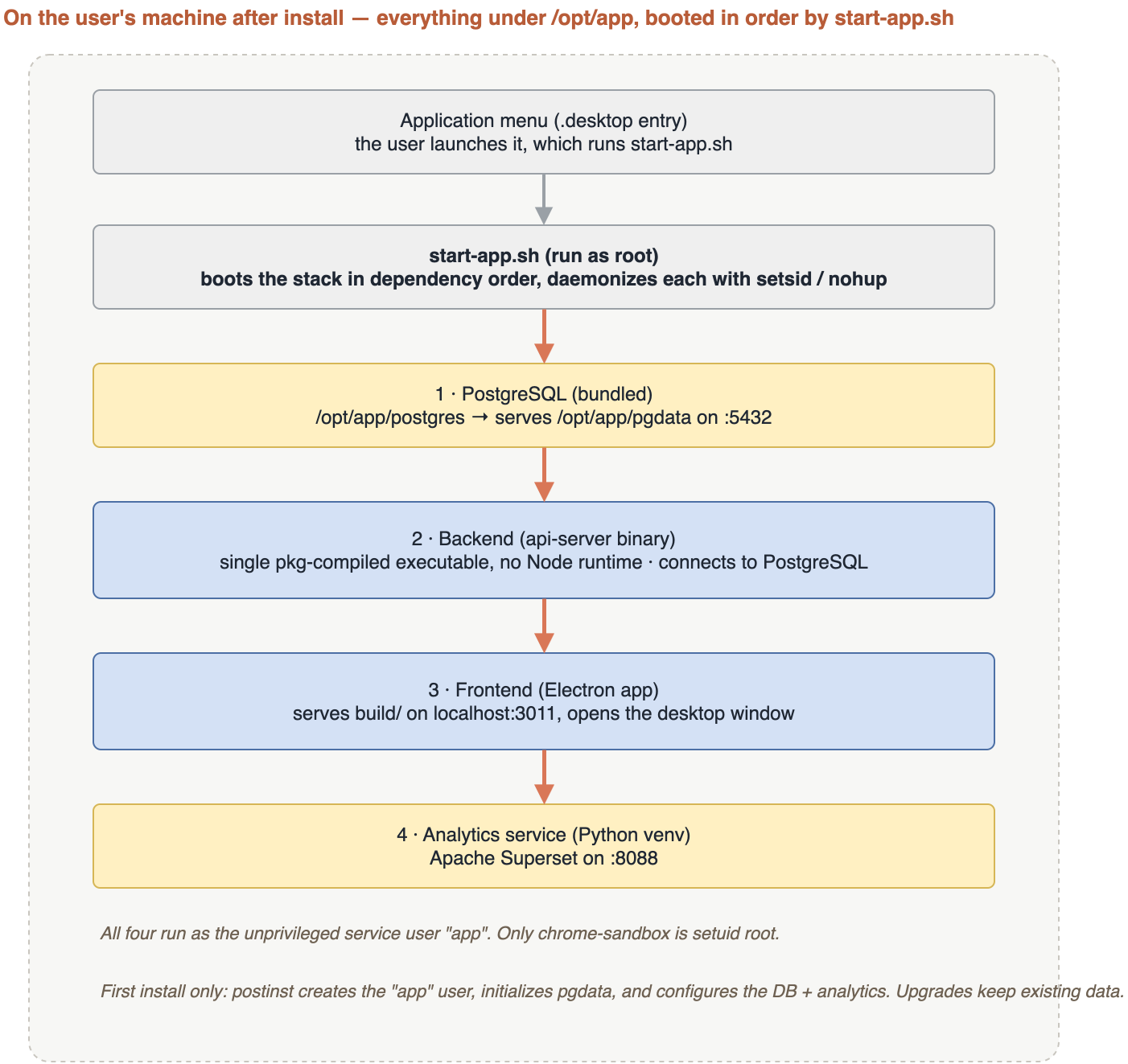
Building the package is a Debian tree plus dpkg-deb. The control file declares the few things the target must already have; everything else travels inside:
Package: app
Architecture: amd64
Depends: python3, python3-pip, nodejs (>= 22.0.0)
dpkg-deb --build "$DEB_DIR"
mv "$DEB_DIR.deb" "dist/app_${VERSION}_amd64.deb"The real machine setup happens once, in the Debian postinst. Three parts are worth calling out:
# 1. a dedicated, unprivileged service user owns everything
id -u app &>/dev/null || useradd -r -s /bin/bash -m -d /opt/app app
chown -R app:app /opt/app

# 2. Electron's sandbox helper MUST be setuid root, or the app refuses to launch
if [ -f "/opt/app/frontend/chrome-sandbox" ]; then
  chown root /opt/app/frontend/chrome-sandbox
  chmod 4755  /opt/app/frontend/chrome-sandbox
fi

# 3. initialize the DB only on a FRESH install; never on upgrade
if [ ! -f "/opt/app/pgdata/PG_VERSION" ]; then
  /opt/app/scripts/configure-postgresql.sh      # initdb + conf (Step 3)
  /opt/app/scripts/create-database.sh
else
  echo "Existing data found, skipping DB init"  # upgrade: keep user data
fi
/opt/app/scripts/configure-superset.sh          # venv + wheels (Step 4)
That fresh-vs-upgrade check is what makes reinstalling safe: a customer’s data survives an update because the payload only touches pgdata when it does not already exist.
start-app.sh (run as root) then boots the stack in order, daemonizing each with setsid/nohup and logging to its own file: PostgreSQL (via the wrapper), then the backend binary, then the Electron frontend, then Superset. A .desktop entry launches it from the application menu.
Windows: authoring the MSI with WiX
Windows does not have a postinst, so the equivalent logic is authored into a WiX MSI. The build has three WiX steps: heat.exe harvests each payload folder into a component group, candle.exe compiles the .wxs sources, and light.exe links them into the .msi.
# 1. harvest each payload folder (repeat for frontend, backend, postgres, ...)
heat.exe dir "$src\frontend" -cg FrontendFiles -dr FRONTEND `
  -gg -scom -sreg -sfrag -srd -var var.FrontendSource -out "$tmp\FrontendFiles.wxs"

# 2. compile the main authoring + each harvested fragment
candle.exe -arch x64 -dProductVersion=$version `
  -dFrontendSource="$src\frontend" -dPostgresSource="$src\postgres" `
  app.wxs "$tmp\FrontendFiles.wxs" -out "$tmp\"

# 3. link into the MSI (WixUIExtension gives the install UI)
light.exe -ext WixUIExtension -out "dist\app.msi" "$tmp\*.wixobj"
The .wxs declares a perMachine, x64 product that installs into C:\Program Files\App, with a directory per payload folder and a Feature referencing each harvested component group:
<Product Id="*" Name="App" Version="$(var.ProductVersion)"
         Manufacturer="App" UpgradeCode="{YOUR-STABLE-GUID}">
  <Package InstallerVersion="500" Compressed="yes" InstallScope="perMachine" Platform="x64" />
  <Directory Id="ProgramFiles64Folder">
    <Directory Id="INSTALLFOLDER" Name="App">
      <Directory Id="FRONTEND" Name="frontend" />
      <Directory Id="BACKEND"  Name="backend" />
      <Directory Id="POSTGRES" Name="postgres" />
      <Directory Id="SCRIPTS"  Name="scripts" />
    </Directory>
  </Directory>
  <Feature Id="Main" Title="App" Level="1">
    <ComponentGroupRef Id="FrontendFiles" />
    <ComponentGroupRef Id="PostgresFiles" />
    <!-- ...backend, scripts... -->
  </Feature>
</Product>
Most of the payload is harvested by heat.exe, but files you author by hand (the config scripts, the icon) sit in explicit components. A component is the unit WiX installs and tracks; each gets a stable GUID and lives under a directory, and its Id is what the Feature references:
<DirectoryRef Id="SCRIPTS">
  <Component Id="ScriptsComponent" Guid="{YOUR-STABLE-GUID}">
    <File Id="ConfigurePg"  Source="$(var.ScriptsPath)\configure-postgresql.ps1" KeyPath="yes" />
    <File Id="ConfigureCfg" Source="$(var.ScriptsPath)\configure-app-config.ps1" />
    <File Id="ConfigureSs"  Source="$(var.ScriptsPath)\configure-superset.ps1" />
  </Component>
</DirectoryRef>

<Icon Id="AppIcon" SourceFile="$(var.AssetsPath)\app-icon.ico" />
<Property Id="ARPPRODUCTICON" Value="AppIcon" />
The install-time setup (the Windows counterparts of the postinst) runs as deferred custom actions after the files are copied, in order: write the app config, initialize PostgreSQL, then optionally set up Superset. Deferred actions run elevated, in the system context:
<CustomAction Id="ConfigureAppConfig" Directory="INSTALLFOLDER" Execute="deferred" Return="check"
ExeCommand="powershell.exe -ExecutionPolicy Bypass -File "[INSTALLFOLDER]scripts\configure-app-config.ps1"" />
<CustomAction Id="ConfigurePostgreSQL" Directory="INSTALLFOLDER" Execute="deferred" Return="check"
ExeCommand="powershell.exe -ExecutionPolicy Bypass -File "[INSTALLFOLDER]scripts\configure-postgresql.ps1"" />
<CustomAction Id="ConfigureSuperset" Directory="INSTALLFOLDER" Execute="deferred" Return="check"
ExeCommand="powershell.exe -ExecutionPolicy Bypass -File "[INSTALLFOLDER]scripts\configure-superset.ps1"" />
<InstallExecuteSequence>
<Custom Action="ConfigureAppConfig" After="InstallFiles">NOT REMOVE</Custom>
<Custom Action="ConfigurePostgreSQL" After="ConfigureAppConfig">NOT REMOVE</Custom>
<Custom Action="ConfigureSuperset" After="ConfigurePostgreSQL">CONFIGURE_SUPERSET="1" AND NOT REMOVE</Custom>
</InstallExecuteSequence>The analytics setup is the slowest, heaviest part, so it is optional, gated by a property the user toggles with a checkbox in a custom dialog. The checkbox writes the CONFIGURE_SUPERSET property that the sequence condition above reads:
<Property Id="CONFIGURE_SUPERSET" Value="0" />

<UI>
  <Dialog Id="OptionsDialog" Width="370" Height="270" Title="[ProductName] Setup">
    <Control Id="SupersetCheck" Type="CheckBox" X="20" Y="80" Width="330" Height="17"
             Property="CONFIGURE_SUPERSET" CheckBoxValue="1"
             Text="Configure the analytics service (Superset)" />
    <Control Id="Next" Type="PushButton" X="236" Y="243" Width="56" Height="17" Default="yes"
             Text="Next" />
  </Dialog>
</UI>
Two things to know about the Windows side. First, the analytics setup is optional, gated by a checkbox in the installer UI (CONFIGURE_SUPERSET), because it is the slowest, heaviest part. Second, nothing is registered as a Windows service: the configure-*.ps1 actions initialize PostgreSQL (initdb.exe into a data dir) and write config, but the app is started from shortcuts, not a service. If you want auto-start, add a ServiceInstall or a scheduled task. The Windows configure-*.ps1 scripts mirror the Linux ones: initdb.exe with -U app -E UTF8 -A scram-sha-256, a venv under %APPDATA%, and a config copy that skips if one already exists.
Step 7. Automate it in CI
The whole thing runs in CI so a push produces downloadable installers with nobody building by hand. Two jobs, one per OS:
- Windows job on a Windows executor: installs Node 22, the AWS CLI,
pkg, and WiX, then runsbuild-complete.ps1. - Linux job in a Linux container: installs build deps, then runs
build.sh --compile-postgres.
Both upload their zipped installer to object storage (S3). There are two kinds of run:
- Release builds (default workflow), keyed by branch. The stable branch publishes to
releases/<os>/v<version>/plus areleases/<os>/latest/; a pre-release branch publishes underreleases/develop/.... Version comes straight frompackage.json. - Preview builds (an on-demand parameter) let you pin any frontend/backend branch combination and get a one-off installer, uploaded to
previews/fe-<branch>_be-<branch>/.... The job prints a direct download URL at the end, and older previews are pruned so only the five most recent survive.
# CircleCI, simplified: one job builds the MSI, keyed to the source branches
build-msi:
  executor: { name: win/default }
  steps:
    - checkout
    - run: # install Node 22, AWS CLI, pkg, WiX  (omitted)
    - run:
        name: Build the installer
        command: |
          $env:FRONTEND_BRANCH = "<< parameters.frontend_branch >>"
          $env:BACKEND_BRANCH  = "<< parameters.backend_branch >>"
          ./windows/scripts/build-complete.ps1
    - run:
        name: Upload to S3
        command: aws s3 cp windows/app-installer-windows.zip $s3Target
Preview builds are the quiet win here: a reviewer can get a real, installable build of any feature branch from a URL, without a local Windows or Linux toolchain.
Problems we hit, and the fixes
- Electron would not launch on Linux. Its
chrome-sandboxhelper must be setuid root; packaged as a normal file, the app dies on start. Fix:chown root+chmod 4755inpostinst. The single most common Electron-on-Linux packaging trap. pkgshipped a binary that crashed at runtime on a missing file. pkg only embeds JS it can statically trace. Fix: list SQL and vendored assets explicitly underpkg.scripts/pkg.assets.- The compiled backend could not find the shared internal package. pkg bundles
node_modules, so the shareddb-modelspackage must be resolved locally (npm linkor afile:dependency) beforetscandpkgrun. - TypeScript emitted to
dist/src/and SQL files had CRLF endings, so the packaged binary looked for files that were not where it expected. Fix: flattendist/srcintodist, and normalize SQL to LF before copying. npm installfailed on peer-dependency conflicts in a large, older frontend. Fix:npm i --force(pragmatic for a pinned, tested lockfile); on the backend,--legacy-peer-depson retry.- The React build ran out of memory in CI. Fix:
NODE_OPTIONS="--max-old-space-size=8192". - electron-builder’s output folder name varied (
dist/vsbuild/vsout/), and the binary was named after the Electron project. Fix: probe the known*-unpackedlocations and rename the binary to a stableApp. - The bundled PostgreSQL would not start: its libraries live in a non-standard prefix. Fix: a wrapper that prepends
postgres/libtoLD_LIBRARY_PATHbefore running any pg tool. - Upgrades risked wiping the customer’s database. Fix: initialize the DB only when
pgdata/PG_VERSIONis absent, so an update preserves existing data. - We could not use electron-builder’s own installer, because it only packages the UI. Fix: take its
*-unpackedfolder and wrap the full payload in a real OS installer (WiX / dpkg). - Preview builds piled up in S3. Fix: after each upload, list the preview prefixes by last-modified and delete all but the five most recent.
The methodology is the point
Wrapping a web page in Electron is a weekend project. Shipping a product a customer installs in one click, and can update without losing data, is the real work, and it comes from a few deliberate choices:
- Self-contained by default. The app, its backend, its own PostgreSQL, and the analytics service all travel inside one installer. No cloud, no prerequisites beyond a base runtime, it works offline and on-prem.
- Two layers, kept separate. electron-builder makes the desktop app; a real OS installer (MSI / deb) wraps the whole stack. Conflating them is what makes this hard; separating them is what makes it tractable.
- Reproducible and hands-off. Application code lives in the app repos; the installer repo only orchestrates. CI rebuilds everything from source, and any branch can be pinned, so a build is a function of its inputs, not of someone’s laptop.
- Idempotent, data-safe installs. Fresh installs initialize; upgrades detect existing data and leave it alone. A dedicated service user owns the install, with elevated permissions only where Electron strictly requires them.
The download link is the last five percent. The value is a build that turns three source repos into a trustworthy, updatable, cross-platform installer every single time, without a human in the loop.
We do this packaging work for clients shipping into airgapped and on-premise environments — tell us what you're shipping.